GPUs face a debilitating trade-off when managing low-latency pipelines: balancing interactivity with utilization.
There are techniques splitting the AI inference phases across two GPU pools in prefill-decode disaggregation (or PDD) or in speculative decoding (SpecDec). Both techniques still fall face-first into the same classic issue GPUs face: utilization is sacrificed, somewhere in the pipeline, at a high enough volume that it dramatically raises the total cost of running these GPUs.
Our memory-optimized accelerator, Corsair, directly attacks that tradeoff. Deploying SpecDec with Corsair unleashes those GPUs that, even in disaggregated pipelines, are restricted by the memory bandwidth they offer.
Corsair runs a smaller draft model at extremely low latency with high-performance SRAM memory that proposes results to a GPU verifier with a larger model, which then processes the results in a massively parallelized manner and selects the best results. Compared with hosting the draft model on GPUs we see 2-3x performance boost in a GPU-only SpecDec pipeline, and up to 5x boost over GPU-only baseline configurations without speculative decoding.
Qwen3-235B with Corsair-enabled heterogeneous pipelines running SpecDec can boost interactivity at 400+ tok/s/user and up to 80% reduction in AI inference latency.
SpecDec is just one of several ways we are delivering extremely low latencies for AI inference with Corsair. Heterogeneous pipelines with Corsair and GPUs in attention-FFN disaggregation (AFD) deliver a colossal speed-up to AI inference. Both take advantage of the fact that Corsair is an air-cooled, PCIe enabled card that is plug-and-play in data centers already running GPUs to both drastically reduce latency and maximize the value of existing GPUs.
Let’s get into how SpecDec works and how we achieved it. You can see first-hand the results in our new d-Matrix Demo Cloud, which is now generally available to select customers.
How SpecDec works, and why Corsair
In this heterogeneous pipeline, the AI inference consists of 3 total steps. GPUs handle the prefill phase, which processes in a highly parallel manner and maximizes the utilization of the GPU. It then moves to the decode phase, which consists of two parts: the speculative decode pool and the verification pool. Corsair produces draft results running Qwen3-1.7B on two Corsair cards (which, in the future, can realistically be any small model) and then sends them to the GPU. The GPU then selects the best result and re-seeds the draft model.
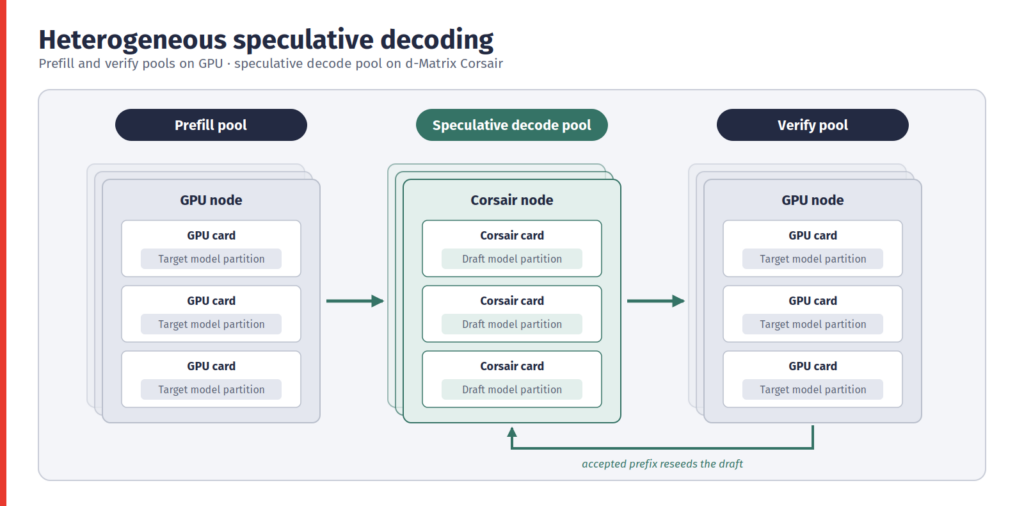
The Corsair speculator node is running a fully independent inference loop with its own KV Cache. But the small nature of the model makes interactivity bound by the speed at which model weights and data from the KV cache can move back and forth to memory. On-chip SRAM enables memory bandwidth of 150 TB/s compared to 3.35 TB/s for standard HBM3e.
Solution Architecture
In our setup, the GPU node consisting of 2-4xH200s in this heterogeneous setup runs SGLang with the d-Matrix plugin, serves the OpenAI-compatible HTTP endpoint directly to clients, and calls out to the Corsair node consisting of 8 Corsair cards for draft tokens. The Corsair node runs the draft model on native d-Matrix hardware acceleration. The nodes communicate over TCP: control over ZeroMQ, data over plain TCP.
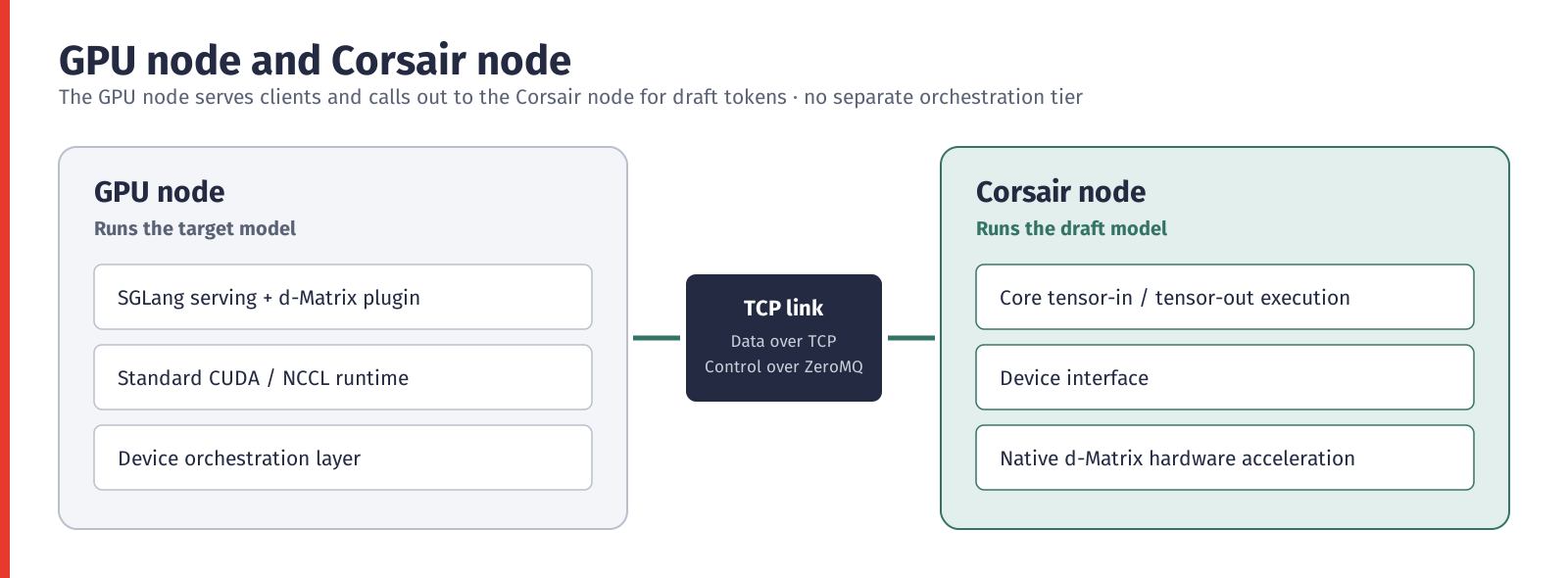
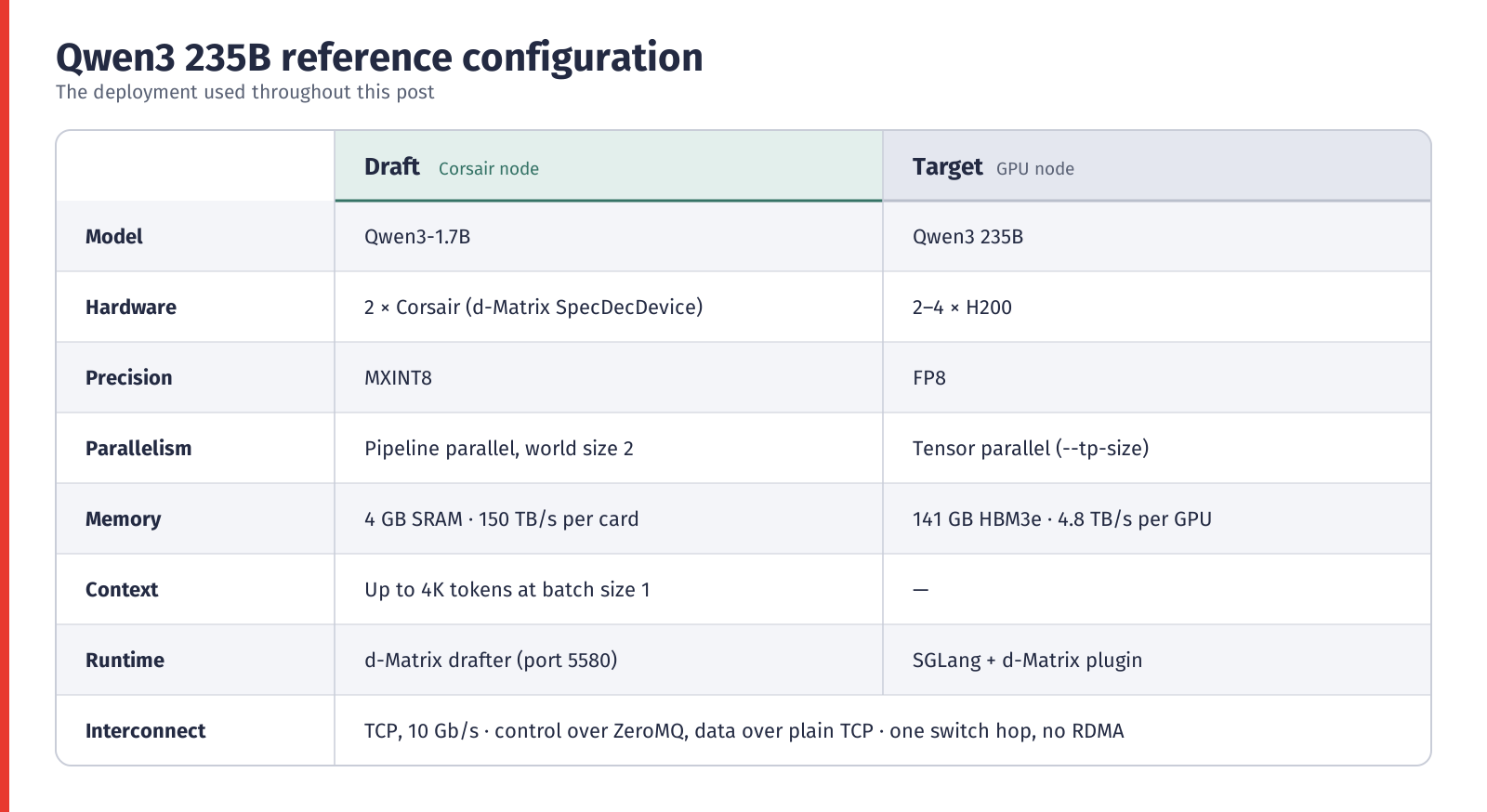
Sizing and networking. The draft node scales up to 8 Corsair cards, and the target node scales up to 8 GPUs; DRAFTER_CARDS, TP_SIZE and BASE_GPU_ID deployment configurations select which ones are used. The minimum deployment is one GPU server plus one Corsair server, with all traffic on a single onboard 1G/10G Ethernet link (plain TCP to port 5580, carrying both control and data). One switch hop is ideal, and RDMA NICs are not needed today.
Deployment
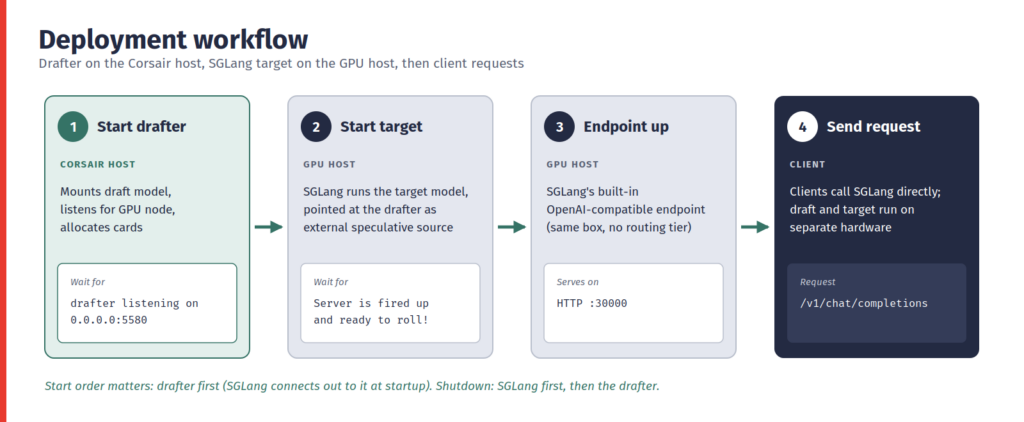
Deployment for Corsair-enabled SpecDec workflows follows four steps, with the drafter started first because SGLang connects to it at startup:
- Start the drafter on the Corsair host. It mounts the draft model, listens for the GPU node, and allocates cards.
- Start the target on the GPU host. SGLang launches pointed at the drafter as its external speculative source.
- Endpoint comes up. SGLang’s built-in OpenAI-compatible endpoint serves requests.
- Send requests. Clients call SGLang directly.
Drafter and Target
The draft and target portions of the deployment can be stood up following a compose flow:
- SGLang operates as the entry point for inference requests and orchestrates communication between the GPU and draft nodes as part of the speculative decoding pipeline.
- SGLang launches on the GPU node with –speculative-algorithm and –speculative-external-endpoint, the latter pointing at the drafter, while –tp-size and –base-gpu-id choose the GPUs.
drafter/docker-compose.yml (Corsair host)

services:
  drafter:
    image: ${DRAFTER_IMAGE:-spec_dec_drafter:latest}
    privileged: true
    network_mode: ${DRAFTER_NETWORK_MODE:-bridge}
    ports:
      - "${DRAFTER_PORT:-5580}:5580"
    volumes:
      - /dev:/dev
      - ${DRAFTER_MODEL_DIR}:/model
    command: >
      --amp_path=/model
      --zmq_endpoint=tcp://0.0.0.0:5580
      --cards=${DRAFTER_CARDS}
    # releases cards on SIGTERM — give it time
    stop_signal: SIGTERM
    stop_grace_period: 30s
sglang/docker-compose.yml (GPU host)
services:
sglang:
image: ${SGLANG_IMAGE}
shm_size: "32g"
ipc: host
cap_add: [SYS_NICE] # NUMA pinning
ports:
- "${PORT}:${PORT}"
volumes:
- ${MODEL_DIR}:/model
command:
- python -m sglang.launch_server
- --model-path /model
- --speculative-algorithm ${SPECULATIVE_ALGORITHM}
- --speculative-external-endpoint
${SPECULATIVE_EXTERNAL_ENDPOINT}
- --tp-size ${TP_SIZE} --base-gpu-id ${BASE_GPU_ID} Deploying and validating the SpecDec pipeline
The same four steps run on each host. Wait for each log line before moving on, and stop SGLang before the drafter.
# Corsair host — reset cards, then start the drafter
sudo dmsmi reset --devices <card-index>
docker compose up -d
docker compose logs -f drafter
  → wait for: drafter listening on 0.0.0.0:5580
# GPU host — start SGLang (drafter must already be up)
docker compose up -d
docker compose logs -f sglang
  → wait for: Server is fired up and ready to roll!
# Client — send a request (only after both logs above appear)
curl http://<gpu-host>:<PORT>/v1/chat/completions \
  -H "Content-Type: application/json" \
  -d '{"model": "/models/glm-5.2", "prompt": "...",
       "max_tokens": 200, "temperature": 0.0}'
# Stopping — SGLang first, then the drafter
docker compose down   # in sglang/, then in drafter/
Command-line walkthrough
Industry-standard client integrations
SGLang exposes the standard OpenAI-designed Chat Completions and Responses APIs directly— simply point the OpenAI SDK’s base_url at the GPU host. Existing client work remains completely unchanged and no gateway is necessary: it is a drop-in endpoint API that sweeps the complexity for broader enterprises under the rug.
Here we will use the OpenAI Python SDK, and you can see:
- The model value is the name SGLang serves, which here is the –model-path from the compose file.
- Agentic apps work the same way: a model-provider entry in ~/.codex/config.toml routes Codex CLI through the SpecDec endpoint with zero CLI changes.
OpenAI SDK: Responses

from openai import OpenAI
client = OpenAI(
    base_url="http://<gpu-host>:30000/v1",
    api_key="EMPTY",  # placeholder value
)
resp = client.responses.create(
    model="/model",
    input="Explain SpecDec.",
    max_output_tokens=200,
    temperature=0.0,
)
print(resp.output_text)
OpenAI SDK: Chat Completions
from openai import OpenAI
client = OpenAI(
base_url="http://<gpu-host>:30000/v1",
api_key="EMPTY", # placeholder value
)
resp = client.chat.completions.create(
model="/model",
messages=[{"role": "user",
"content": "Explain SpecDec."}],
max_tokens=200,
temperature=0.0,
)
print(resp.choices[0].message.content)Benchmark Results
This section summarizes four serving scenarios for Qwen3 235B: Corsair-assisted speculative decoding, EAGLE3, GPU/GPU standalone speculative decoding, and a no-speculation baseline. Each scenario was swept across draft response lengths from 5 tokens to 64 tokens (Lookahead length L).
- SpecDec with draft models run on Corsair reaches 418.5 tokens/s/user at L=16 (TPOT 2.10 ms). At L=16, Corsair delivers 418.5 tokens/s/user (TPOT 2.39 ms at MAL 9.5), 1.99x EAGLE3’s best (210.5 tokens/s/user at L=5), 2.30x GPU/GPU standalone’s best (181.8 at L=8), and 4.81x the no-speculation baseline (87.0).
- Corsair delivers the lowest end-to-end latency: 0.635 s for a 256-token response, versus 1.311 s (EAGLE3), 1.502 s (GPU/GPU) and 3.033 s (baseline).
- EAGLE3 and GPU/GPU standalone peak at short lookahead (L=5 and L=8) and slow down as L grows, since their per-token cost rises faster than their MAL.
Benchmark setup
Deployment configurations
- Target model: Qwen3 235B, verified on 2x H200 GPUs in every scenario.
- GPU deployment: 2x H200 GPUs only (EAGLE3, GPU/GPU standalone and no-speculation scenarios).
- Corsair deployment: 2x Corsair cards running the draft model alongside the 2x H200 GPUs that run the target model. The measured Corsair draft step time is 0.3 ms.
- Draft models: Qwen3 1.7B (Corsair) and EAGLE3. Mean accepted length (MAL) was recorded for each as a function of lookahead L.
Measurement parameters
| Parameter | Value |
| Output tokens per request (N) | 256 |
| Average TTFT (all scenarios) | 100 ms |
| No-speculation baseline TPOT (aka without SpecDec) | 11.5 ms |
| Corsair draft time per token | 0.3 ms |
| Average computed SpecDec Verification time on GPU across all Lookahead values | 17.9 ms |
| Lookahead values tested (L) | 5, 8, 12, 16, 20, 24, 32, 40, 48, 56, 64 |
Metric definitions
- MAL: mean number of tokens accepted per verification step at a given lookahead L.
- Tokens/s/user: 1000 / TPOT (ms).
- TPOT (in Speculative decoding): (draft time + verification time + overhead) / Average Accepted Tokens per Round
Results
Best operating point per scenario
The table shows each scenario at the lookahead that minimizes TPOT. The no-speculation baseline does not use lookahead.
| Scenario | Best L | TPOT (ms) | Tokens/s/user | E2E latency (s) | TPOT speedup vs. no-spec |
| SpecDec with disaggregated draft on Corsair | 32 | 2.10 | 476.4 | 0.635 | 5.48x |
| EAGLE3 | 5 | 4.75 | 210.5 | 1.311 | 2.42x |
| SpecDec with disaggregated draft on GPU | 8 | 5.50 | 181.8 | 1.502 | 2.09x |
| No-speculation baseline | n/a | 11.50 | 87.0 | 3.033 | 1.00x |
Table 1. Best operating point per scenario (Corsair row highlighted).
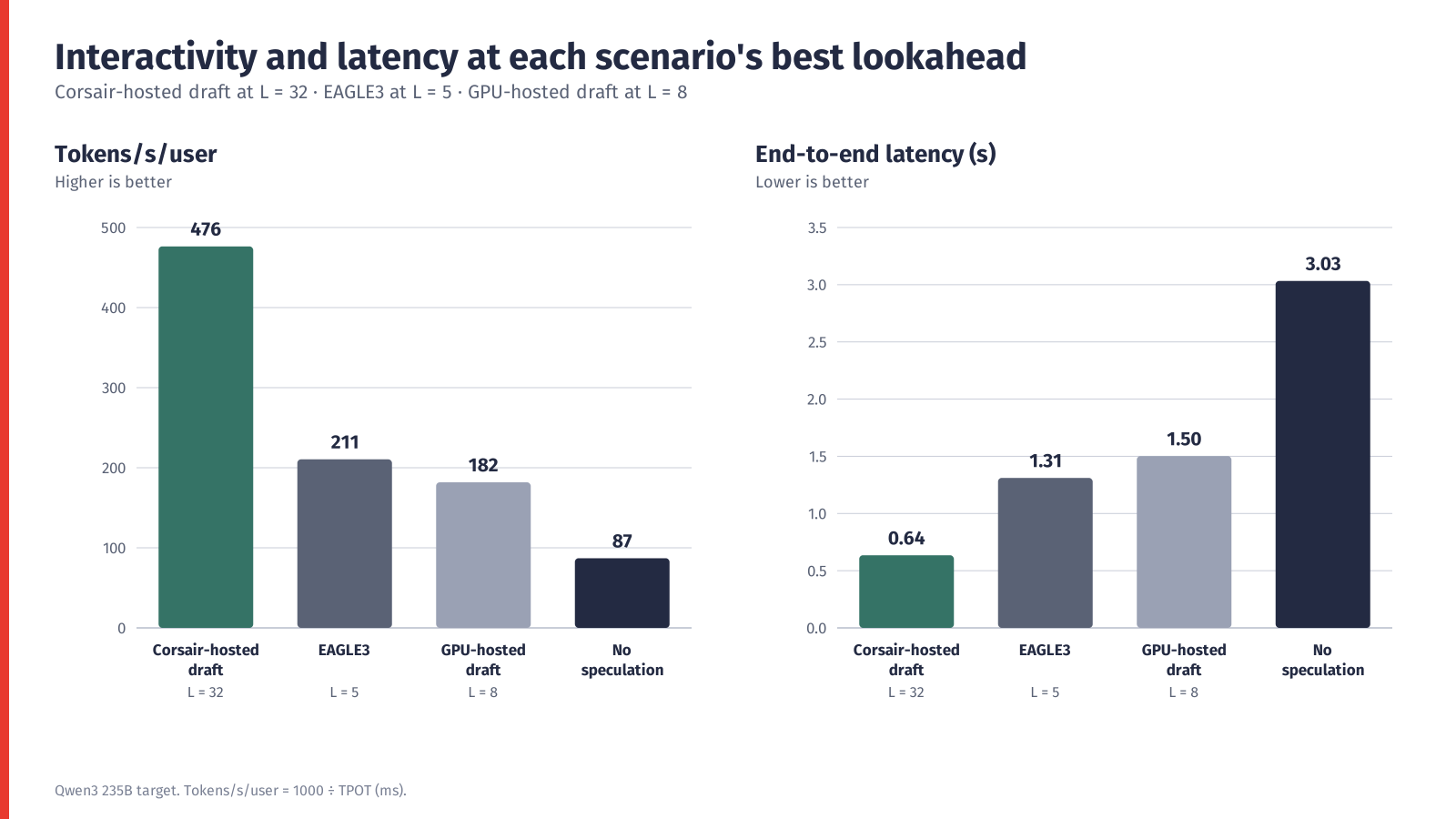
Figure 1. Tokens/s/user and end-to-end latency at each scenario’s best lookahead.
Mean accepted length
MAL for the Qwen3 1.7B draft rises steeply with lookahead, from 4.5 at L=5 to 16.0 at L=56, then saturates. EAGLE3 stays between 3.8 and 4.55 MAL across the whole sweep.
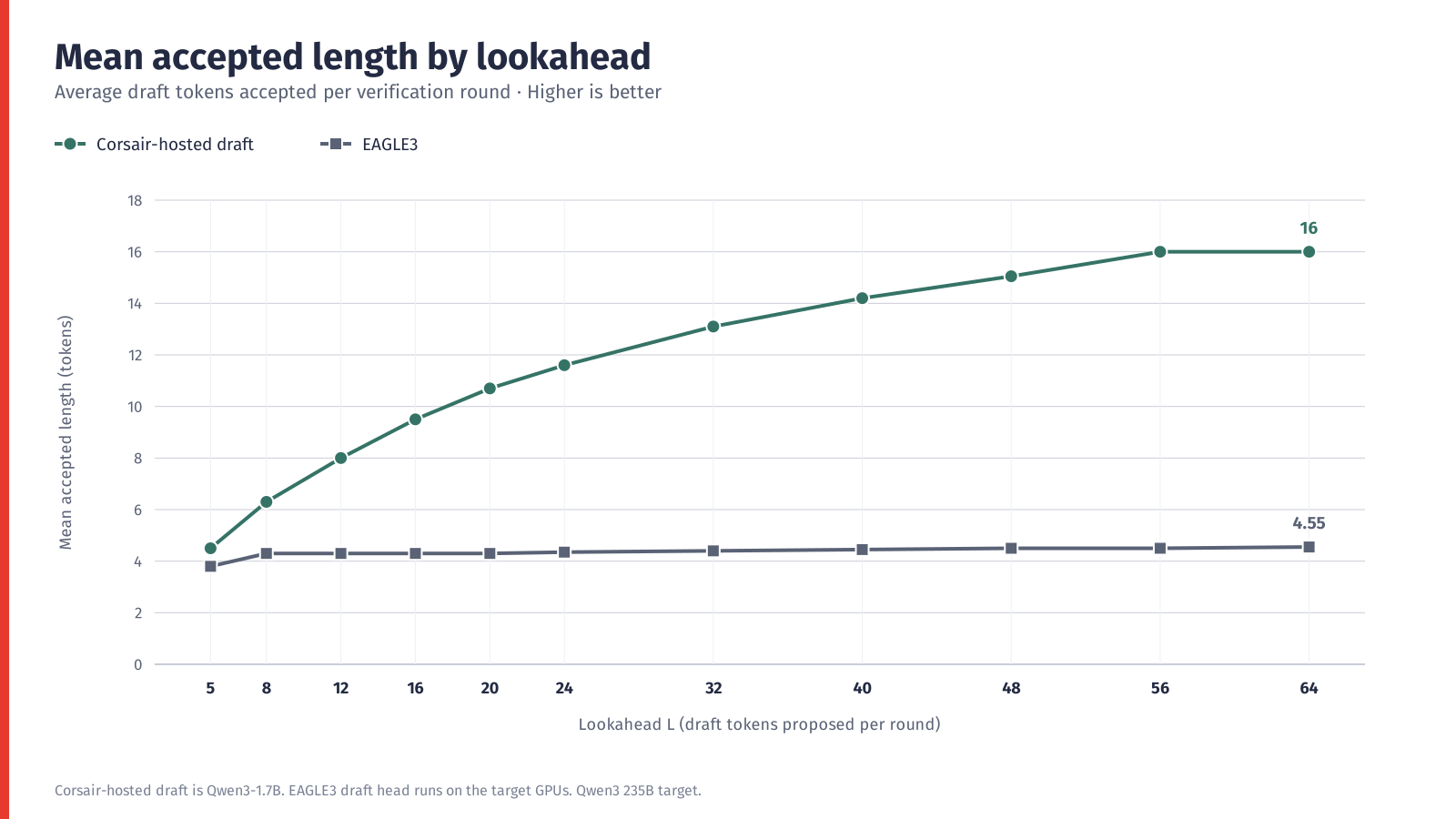
Figure 2. Mean accepted length versus lookahead L.
| Lookahead L | Qwen3 1.7B MAL | EAGLE3 MAL |
| 5 | 4.5 | 3.8 |
| 8 | 6.3 | 4.3 |
| 12 | 8 | 4.3 |
| 16 | 9.5 | 4.3 |
| 20 | 10.7 | 4.3 |
| 24 | 11.6 | 4.35 |
| 32 | 13.1 | 4.4 |
| 40 | 14.2 | 4.45 |
| 48 | 15.05 | 4.5 |
| 56 | 16 | 4.5 |
| 64 | 16 | 4.55 |
Table 2. MAL by lookahead.
Interactivity
Corsair peaks at 476.4 tokens/s/user at L=32 and stays above 460 tokens/s/user from L=24 to L=56. Beyond L=32 the extra draft cost (0.3 ms per step) outweighs the small MAL gains. EAGLE3 and GPU/GPU decline steadily as L increases, and all scenarios stay above the baseline’s 87.0 tokens/s/user.
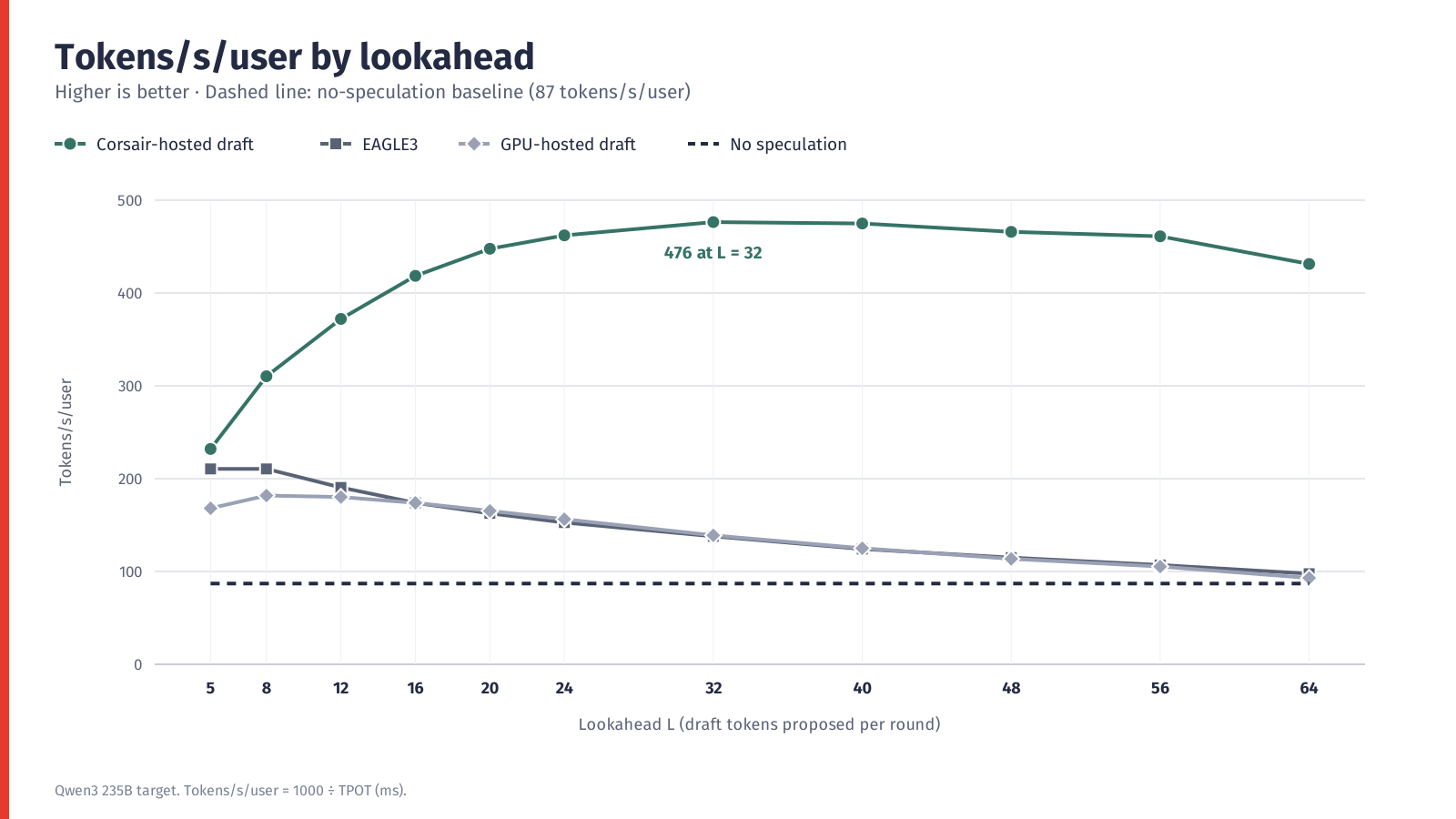
Figure 3. Tokens/s/user versus lookahead L (dashed: no-speculation baseline).
| Lookahead L | Corsair | EAGLE3 | GPU/GPU standalone | No-spec baseline |
| 5 | 232.0 | 210.5 | 168.1 | 87.0 |
| 8 | 310.3 | 210.5 | 181.8 | 87.0 |
| 12 | 372.1 | 190.5 | 180.2 | 87.0 |
| 16 | 418.5 | 173.9 | 173.9 | 87.0 |
| 20 | 447.7 | 162.6 | 165.3 | 87.0 |
| 24 | 462.1 | 152.7 | 156.3 | 87.0 |
| 32 | 476.4 | 137.9 | 138.9 | 87.0 |
| 40 | 474.9 | 124.2 | 125.0 | 87.0 |
| 48 | 465.9 | 114.9 | 113.6 | 87.0 |
| 56 | 461.1 | 107.0 | 105.3 | 87.0 |
| 64 | 431.3 | 97.6 | 93.0 | 87.0 |
Table 3. Tokens/s/user by lookahead.
Why it matters: lower cost per token, lower energy use
Running large AI models is expensive, and most of the cost comes from the GPUs doing the work and the electricity they consume. Moving the speculative decoding drafter from the GPUs onto Corsair tackles both.
- Every token costs less to produce. Today the GPUs spend part of their time on generating response tokens sequentially. Corsair enables GPUs to run in a more highly parallel manner to verify draft proposals, taking advantage of what it does best: inference with large batch sizes. More output from the same investment (especially from already-implemented GPUs) means a lower cost for each token you serve.
- Less energy for the same work. You can run robust workloads with fewer GPUs and servers thanks to the more efficient setup. Fewer machines running means less electricity for compute and cooling, and a smaller footprint in the data center.
- Faster answers at no extra cost per token. Responses arrive noticeably quicker, so you can offer a more responsive experience without paying a premium for it.
- Flexibility to support a wide variety of models and workloads. Corsair runs a variety of draft models including off-the-shelf open weight and in-house fine-tuned drafters.
- The benefit grows with you. The busier the service and the tighter the response-time goals, the more these savings add up.
- Built for workloads with long, predictable outputs. Corsair can propose long token runs with drafts running at 0.3ms per step at high lookaheads (L=16) and with high acceptance (MAL ~9). This favors applications where much of the output is highly predictable in cases such as code generation, agentic coding, and text summarization.
It doesn’t end at SpecDec
Corsair also delivers extreme low-latency benefits when using AFD with GPUs. We’ve demonstrated successfully implementing AFD with GPT-OSS-20B, delivering more than 800 tokens per second per user. In this configuration, the experts for GPT-OSS-20B reside on eight Corsair cards.
Like SpecDec, AFD shows the ability to take advantage of high performance SRAM-based accelerators to handle memory-bound tasks—such as a small set of activated experts or a smaller draft model—where the blocker is memory bandwidth instead of compute capacity.
You can learn more about how we deployed AFD with Corsair on GPT-OSS-20B here.
Let’s size your deployment together
The right answer depends on your models, traffic and latency goals. Our team will work with you to build a sizing and TCO comparison against your current setup. To get started, we would like to understand:
- The models you serve or plan to serve
- Expected traffic and concurrency
- Your latency and throughput targets
- Your current GPU fleet, cost and energy considerations
You will get a clear view of how much a Corsair-assisted deployment could save in cost and energy for your workload. Please get in touch here.
If you already serve a large model on GPUs, this approach lets you add dedicated draft hardware without re-platforming. Contact d-Matrix to scope a pilot in your own environment.
If you want to see the Qwen SpecDec endpoint in action Sign up for d-Matrix demo cloud.